Holiday White Ink Procedure Guide
Extended Shutdown Procedures during Holidays
Important
When shutting down the printer for (4) days or more it is important to follow the proper procedures to properly maintain the white ink system in your TruFire Printer.
Please always refer to the “White Ink System Guide” in the DigiTech TruFire Manual for more detailed information.
Option 1:
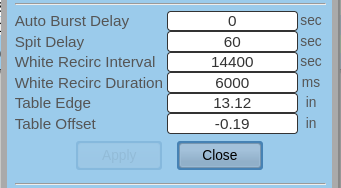
Go to the configure screen in the “Systems” page.
Set the “White Recirc Interval” from 24 sec to 14,400 sec. (See illustration below).
Close the “Configure” screen.
Make sure the blue valve as shown in the illustration above is on.
Select “Recirculation” on the user interface.
Important
Changing from 24 seconds to 14400 seconds on the interval will ensure that the recirculation comes on every 4 hours.
When returning after the extended break, please put the normal number back to 24 seconds, which is needed to properly administer the daily white system procedures.
Option 2:
Remove all the white ink from the main ink tank and drain the ink from the upper reservoir by priming the print heads.
You must then purchase from DigiTech the Ink Storage Fluid and cycle this fluid through the white ink system which includes turning on and recirculating the ink until you have clear liquid going through the entire system.
A manual check on the back when the recirculation comes on will help determine when enough of the white ink has been properly removed from the system. Please discuss with a DigiTech service technician about this procedure.
Please let us know if there is anything we can do to help support you and thank you very much for your business.