Site Preparation Guide TruFire LT and LT-X2
Introduction
The site preparation guide is to help the customer identify potential issues within their location prior to the arrival and installation of the Digitech LED TruFire flatbed printer. Please review this guide and then complete the customer survey checklist prior to the arrival of the Digitech Field Service Engineer (s). Forward the completed checklist to your local Digitech Field Service Engineer or our main office (Fax to 210-545-6007) a minimum of 3 weeks prior to the installation date. This will help ensure the installation of your new TruFire printer will be installed within the agreed upon time frame.
Important
Electrical power, mechanical service pipework and network will need to be installed prior to machine arrival. When in position the printer can be connected locally to mains services. Following this, the machine can progress to the Installation phase.
Printer Specifications
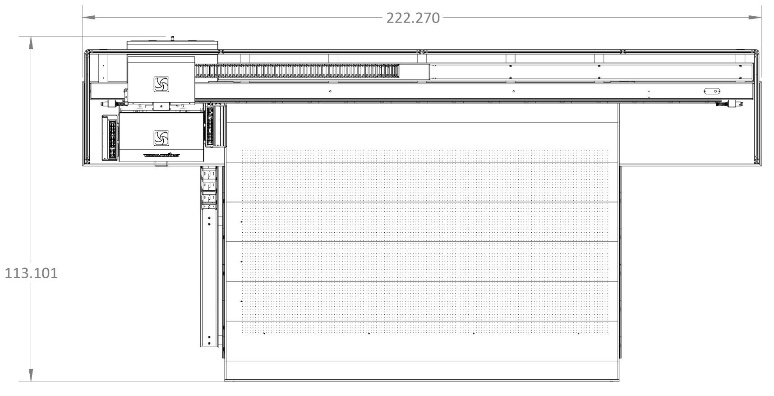
Printer Dimensions and Weight
Height: 69.213 inches (1.758 meters)
Width: 113.101 inches (2.873 meters)
Length: 222.270 inches (5.646 meters)
Weight: 6500 lbs. (2948 kgs)
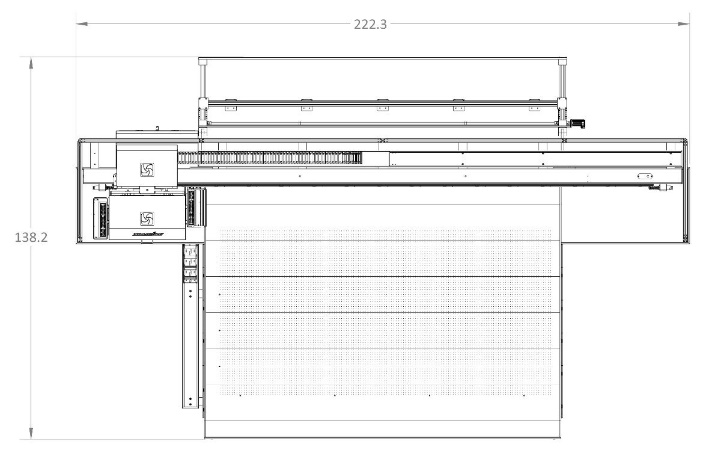
Printer Dimensions and Weight with unloader
Height: 69.213 inches (1.758 meters)
Width: 138.2 inches (3.510 meters)
Length: 222.300 inches (5.646 meters)
Weight: 6500 lbs. (2948 kgs)
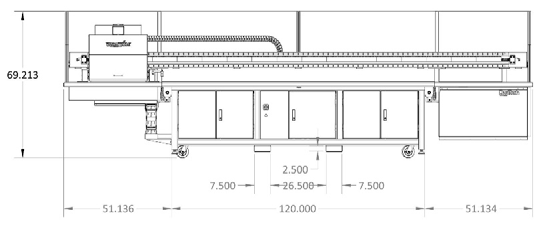
Skidded Dimensions and Weight
Height: 87 inches (2.210 meters)
Width: 123.101 inches (3.127 meters)
Length: 232.270 inches (5.900 meters)
Weight: 6750 lbs. (3062 kgs)
Electrical requirements
Danger
High Voltage. Serious injuries or death may occur by untrained personnel. A certified electrician must connect the printer to the electrical panel.
The printer requires a flexible or rigid connection between the printer electrical cabinet and the electrical panel. The customer is responsible to supply all installation requirements according to local regulations and bylaws. It’s strongly recomend the following:
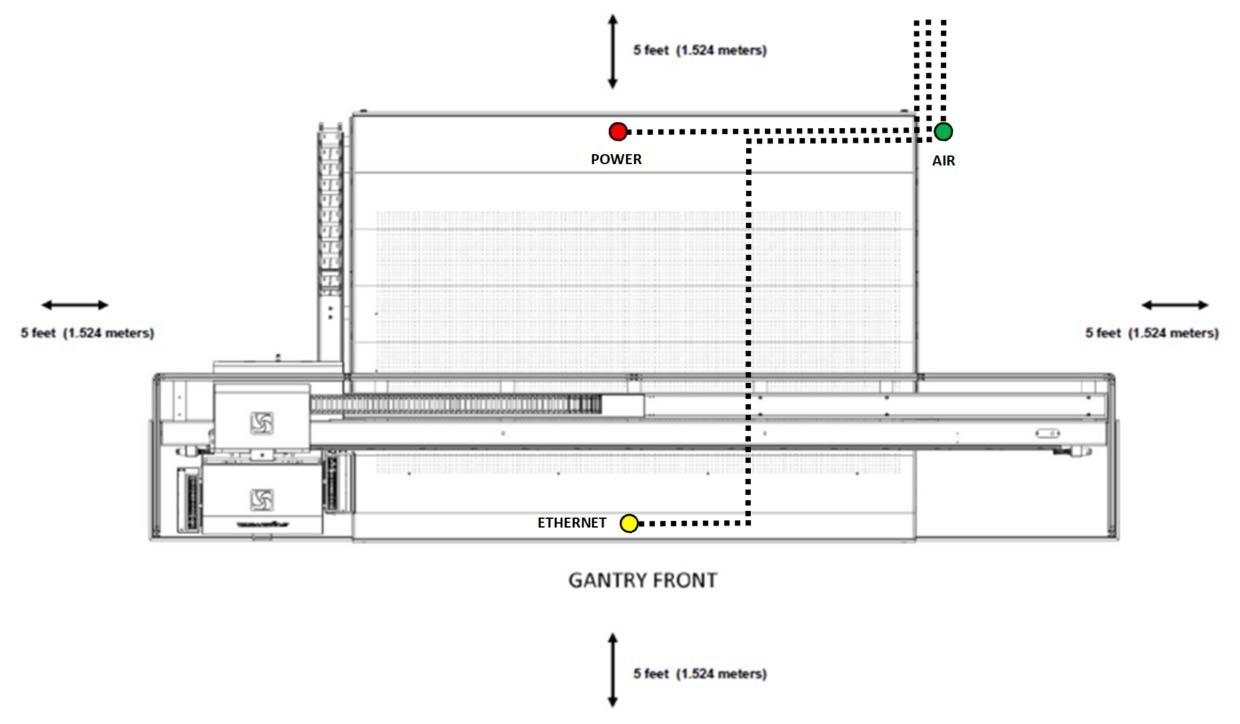
The power line to be routed to the rear left side of the printer and then routed to the rear center cabinet.
Qualified electrician should be onsite to connect the printer to the electrical panel.
The printer installation have a dedicated electrical panel fused disconnect within 10 feet (3.05 m) from the printer location.
A step up/step down transformer be installed if needed to maintain an optimal voltage range of 220VAC - 230VAC.
The following are the electrical specifications:
Single Phase (2 line plus ground)
Supply Voltage: 208VAC - 240VAC (optimal range 220VAC - 230VAC)
Line Frequency: 50/60Hz
Amperage: 60A
Important
Maintain an optimal voltage range of 220VAC - 230VAC
Ground wire AWG size should be the same gauge as the load conductors (e.g. machine where line and neutral is AWG#6 the ground wire should be AWG#6)
Compressed Air Supply Requirements
Caution
Compressed AIR. Improper release could result in injury.
The printer requires a continuous supply line of compressed air with a coupled connection that is easily attached using a flexible hose. The air hose will need to have 1/4 inch I/M female industrial quick connect coupler available. It’s strongly recommend the air line to be routed to the rear left side of the printer.
Compressed air volume: 15 scfm continuous are @ 100-150 psi (vacuum function)
Compressed air pressure: 100-150 psi
Compressed air supply specifications: 5 scfm peak @ 100-150 psi
Compressed air should be dust and moisture free
Important
Air pressure under 100 psi will cause the printer to malfunction.
Environmental Requirements
Important
Strongly recommend assessing ambient conditions to ensure the performance of the printer.
Ambient Temperature: 70°F-75°F (21°C-23°C)
Relative Humidity: 55%-65%
Atmosphere: Well ventilated and low dust
Room Requirements
Important
It’s mandatory to assess floor conditions and the impact of weight as the machine travels to its final position. The printer has higher load capacity casters.
Check the floor flatness and levelness, gradients, or different floor heights that need to be revised.
The printer requires a room to accommodate the printer dimensions, plus any optional upgrade hardware, minimum service requirements, enough space that media can be easily transported, loaded and removed on/off the printer and the printer operation is uninhibited.
Location Requirements
Important
Review the physical location requirements below for all necessary resources during the installation.
Review the physical location requirements below for all necessary resources during the installation.
A rigging team must be present to unload the printer with skid from the transport truck to the designated installation location for the printer.
The loading area must be compliant with the transport truck. The client is responsible for contacting the freight company in advance to determine if additional resources are necessary for extraordinary transport variables.
The receiving area must have enough room to accommodate the skid length 232.270 inches (5.900 meters) and space to lift the printer from the skid.
All doors and openings must be large enough to accommodate the printer width and length. There must be a clear pathway between the receiving area and the installation area so the printer can be moved into position.
A forklift (s) with the lifting capacity of the printer with skid (6750 lbs. (3062 kgs)).The forklift must have minimum forks at least 51 inches (1.295 m) in length.
A minimum of 4 heavy duty skates should be available to move the printer if needed into the designated location.
Network Requirements
Important
A dedicated IP address must be assigned to prevent malfunction or delays while ripping the job files.
A network cable (1000 base-T) connected to the internal PPS Computer System.
Strongly suggest the network cable to be routed to the rear left side of the printer and then routed to the front center cabinet.
The system requires a dedicated IP address, subnet mask, gateway and DNS server (s) if applicable for each printer with internet access for remote troubleshooting and software updates.
Strongly recomend to isolate the users who do not need direct interaction with the printer.
Raster Image Processor (RIP) Requirements
Important
RIP station software,installed and updated on a dedicated desktop computer to be used in conjunction to transfer files to the printer. Follow their respective link for the minimum system requirements.
- ‘Caldera’_ (version 12 or higher)
.._Caldera: https://www.caldera.com/support/minimal-requirements/
- ‘Onyx Production House’_ (version 19 or higher)
- ‘Print Factory’
.._Print Factory: https://help.printfactory.cloud/knowledge-base/system-requirements-v1/
Note
Caldera, Onyx , GMG and Print Factory are registered trademarks of their respective holders. Use of them does not imply any affiliation or endorsement with them.
Safety Requirements
Important
(PPE) Personal Protective Equipment must be wear while operating the printer.
Safety goggles
Coat, smock or other form of protective clothing
Latex/Nitrile powder free gloves
Lint free wipes
Shop rags
Eye wash station within 25 feet (7.62 meters) from the printer
Sink with running water and cleaning agents
Medical supply cabinet
Minimum Service Access Requirements
5 feet (1.524 meters) on all sides of the printer (length of gantry and width of table bed) and any optional upgrade hardware.
24 inches (0.609 meters) from the highest point on the printer when all the covers are open.
The printer should be free of debris and the room should be clear of any obstruction.
Miscellaneous Requirements
Sufficient flush and ink for all colors
Media: Styrene and clear media (if applicable for white) to perform print head alignments.
Lint free wipes and rags.
Powder free Nitrate gloves